
Why Create Custom Units?
FlexiBake allows you to add new units of measure if the default options do not meet your requirements. This feature is useful for production processes that need specialized measurement units for inventory, production, or packaging .
Steps to Adding a Custom Unit of Measure
Step 1:
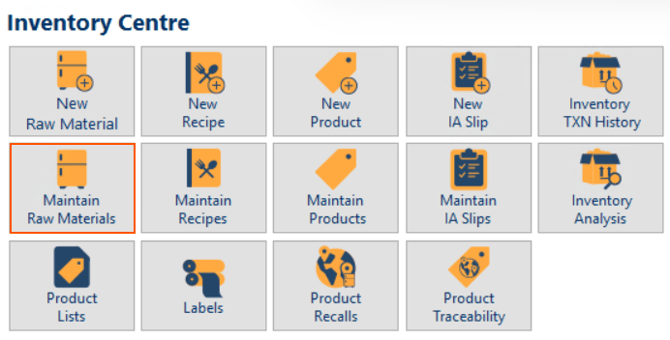
Navigate to the Inventory Centre then the Maintain Raw Materials button.
Step 2:
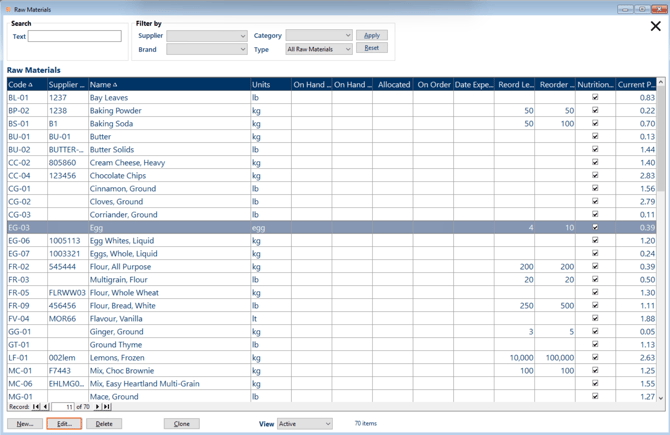
Double click on an existing raw material, or single click then click the Edit button to open it or click New at the bottom of the screen.
Step 3:
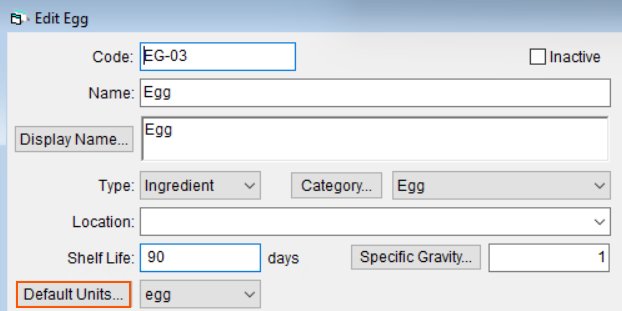
Click the Default Units button.
Step 4:
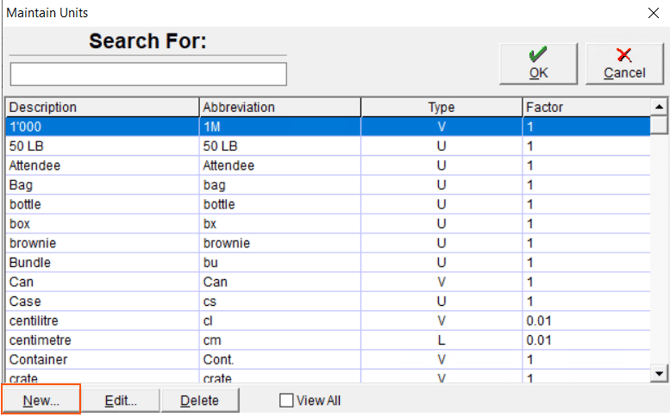
Then, in the pop-up window, click New.
Step 5:
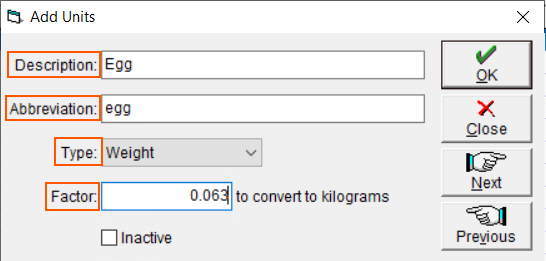
Fill in the following fields for your new Custom Unit:
- Description: The description will be used for internal reference of what the abbreviation stands for.
- Abbreviation: This will be reflected wherever the unit is used.
- Type:
- User - Select 'User' if this unit of measure does not need to have weight or size details recorded. This is not recommended for ingredients as nutritional information is based on weight, instead this is intended for packaging and sell-by units so that you do not need make multiple units
- Area - Select 'Area' if this unit of measure is an area-based unit of measure.
- Length - Select Length if this unit of measure is a length-based unit of measure.
- Volume - Select Volume is this unit of measure is a volume-based unit of measure. If your raw material is an ingredient, you will need to update the specific gravity to use volumetric units. Information on the specific gravity can found in Enter Specific Gravity.
- Weight - Select Weight if this unit of measure is a weight-based unit of measure.
- Factor: If you have not chosen User as the unit type, in the Factor field, enter in the weight of a single item in reference to the provided base unit. For example, the base unit for weight is kilograms, so the factor is how many kilograms is an egg. A large egg is about 0.063 liters so the factor is 0.063.
Tip: For volumetric ingredients, update the specific gravity to ensure accurate calculations, especially for nutritional values.
Step 6:
Click OK to save your custom unit. The new unit will now appear in every unit of measure drop-down throughout FlexiBake.
Note: Use weight-based units for ingredients whenever possible to ensure proper nutritional tracking and Inventory management.
Questions this article might be helpful for answering:
- How do I create a new unit of measure that isn’t listed by default in FlexiBake?
- Can I use custom units like “drop,” “crates,” or “trays” for inventory or recipes?
- Is it possible to add area or length-based units for specialty products?