
Overview
Setting overhead costs helps FlexiBake produce more accurate product and recipe costing. When overhead is configured, FlexiBake uses your annual overhead expenses and production averages to calculate an Overhead Cost Per Person Per Hour, which contributes to deeper cost and margin analysis.
What Counts as Overhead
Overhead includes general business expenses that support production but are not direct ingredient or direct labour costs. Examples include:
- Facility rent or mortgage
- Utilities
- Equipment maintenance or rental
- Non-production wages or salaries, such as reception, supervision, or accounting
- Company vehicle costs
Before You Begin
FlexiBake calculates overhead using:
- Annual overhead cost amounts
- Average production days per month
- Shifts per day
- Hours per shift
- Average number of production personnel on the floor per shift
Note: Overhead values are entered as annual amounts, not monthly amounts.
Open the Overhead Cost Settings
Step 1
Navigate to the Menu Bar, open the Administration drop-down, and click FlexiBake Preferences.
Step 2
Click the Accounting tab.
Step 3
Click Overhead Cost Per Person Per Hour.
Step 4
When the pop-up appears, click Yes to continue.
Enter Annual Overhead Costs
Step 1
Click an existing row in the grid to update an overhead description or annual amount.
Step 2
Click a blank row at the bottom of the grid to add a new overhead entry if needed.
Step 3
Delete unnecessary entries by selecting the row and clicking Delete Row.
Tip: FlexiBake includes default overhead entries. You can keep, update, delete, or expand these to match your business setup.
Organize the Overhead List
Step 1
To add a visual spacer line, click a blank row and enter a space in the description field while leaving the amount at 0.
Step 2
To reorder entries, select the row and use the up and down arrow buttons on the right side of the window.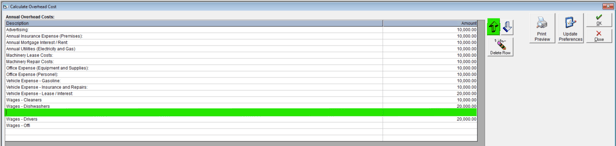
Complete the Overhead Calculation Summary
In the Overhead Calculation Summary section in the bottom-right area, enter your production values.

Review the values carefully so the overhead calculation reflects your normal production environment.
Warning: If the production summary values are inaccurate, the calculated overhead rate will also be inaccurate and may affect product costing results.
Save the Overhead Settings
Click Update Preferences to apply the new overhead calculation and then click OK to save your changes and close the window.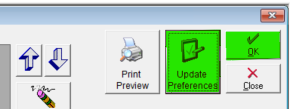
Warning: Make sure you click Update Preferences before closing the window. This step is required for FlexiBake Preferences to reflect the updated Overhead Per Person Per Hour value.
What to Do Next
Continue the costing setup process by entering labour, raw material costs, recipes, and price tiers as needed.
Note: Review your overhead values periodically so costing stays aligned with current operating expenses.