
Understanding Zero Value Invoices
Zero value invoices (also called “blank invoices”) have a total amount of $0.00. These can occur for legitimate business reasons (like samples or non-billable accounts) or due to system/user errors.
Note: Zero value invoices may be triggered intentionally during order entry (samples/complimentary) or during standard operations, especially if preferences are configured to allow them
Why Do Zero Value Invoices Occur?
- All line items on the order are set to $0.00 (common for sample or promotional orders).
- Orders created for customers marked as “non-billable” in their profile.
- Manual invoice creation with either missing product pricing or no line items entered.
- Data entry issues, including using the wrong customer type or missing price tiers.
- Special processing through Route Delivery Slips (RDS) for giveaways, samples, or internal use orders
Tip: Recurring zero value invoices often indicate a mismatch in customer setup or incorrectly managed pricing tiers. Check this when troubleshooting repeated issues
Troubleshooting Steps
To resolve unexpected zero value invoices:
- Open the related Sales Order and review product prices for any $0.00 entries.
- Confirm the customer’s billing type (standard or non-billable).
- Verify the customer’s assigned price tier to ensure prices are set up correctly.
- Verify if the order was intended as a sample or complimentary invoice.
- If pricing edits are made, recalculate and save the invoice. Regenerate the invoice if needed for updated totals.
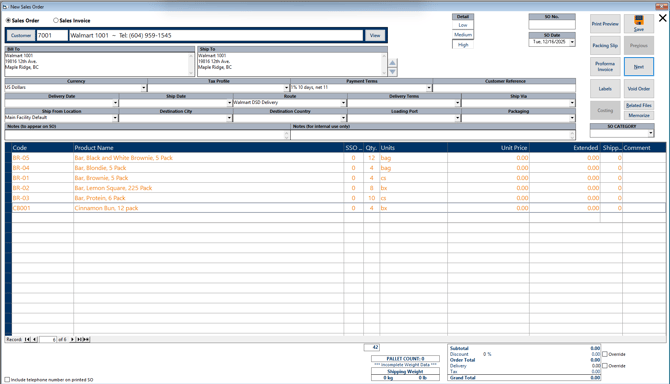
- Review your FlexiBake Preferences, under Billing, for the option to “Suppress zero value invoice warning message.” If enabled, you may not receive a warning when issuing a $0.00 invoice
- Audit invoices regularly to catch and confirm intentional zero value or sample billing.
- Use workflow controls to separate samples or non-billable accounts from regular invoices for auditing and reporting.
Tip: Enforce reminders or approval for creating non-billable/sample invoices to maintain clarity in reporting and customer billing.
Special Scenarios: Route Delivery Slips
There are two main reasons to expect zero value invoices via RDS:
- Sample Orders: If a customer is set up to receive samples, these may be billed with a $0.00 amount intentionally.
- Non-billable Customers: If a customer profile is marked non-billable in the system, invoices generated for them will also show zero value.
These scenarios are common in businesses handing out promotional product or fulfilling internal or complimentary orders.
Tip: Review customer account settings when troubleshooting recurring zero value invoices. Sample or non-billable status is most likely managed at the customer record level or during order entry.
Prevention and Best Practices
- Enforce price controls for standard customers and add reminders for “sample” or non-billable invoice creation.
- Use a dedicated non-billable customer type and sample order workflow to prevent confusion in regular reporting and audits.
- Regularly audit invoices for blank, sample, or non-billable status.
- Confirm setting of "Supress zero value invoices when shipping an order" within FlexiBake Preferences as this could impact your capability to see any warning messages.
When to Contact Support
- If zero value invoices are unexpected, persistent, or affecting regular billing, contact FlexiBake Support.
- Provide sample invoice numbers, related sales order, and clarify customer type/status for quicker resolution
Tip: Attach relevant screenshots or documents and mention if the invoice was for a sample or non-billable customer to assist in troubleshooting.