
Overview
Delivery periods help you organize route deliveries by when trucks leave your facility. This is useful if your deliveries go out more than once per day, such as separate morning and afternoon runs.
Before You Begin
A Delivery Period represents the time of day that deliveries leave your facility. The routes inside that delivery period represent the trucks or route groupings that operate during that time.
Note: If your trucks only leave once per day, you will likely only need one delivery period.
Open Manage Routes
Navigate to the Shipping Centre and click Manage Routes.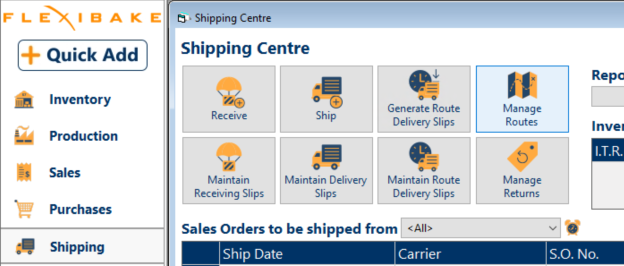
Create the Delivery Period
Step 1
Click the ... button next to the Delivery Period drop-down.
Step 2
In the pop-up window, click New.
Step 3
Enter a Description for the new delivery period.
Step 4
Click OK to save the new delivery period.
Step 5
Click OK again to close the pop-up window.
What to Do Next
After creating the delivery period, create routes and assign them to the correct delivery period. Continue setting up route details such as driver assignments and route sequencing as needed.
Tip: Use clear delivery period names, such as Morning, Afternoon, or Evening, so routes are easier to identify later.