
Overview
What Recipe Lead Times do
A Recipe Lead Time tells FlexiBake how many days before the finished product a recipe must be started. This helps the Schedule Production tool place the recipe on the correct production day instead of scheduling it on the same day as the finished product.
Warning: Recipe Lead Times do not have any effect in Enter Production, these are only available in Schedule Production.
Why this matters
Use Recipe Lead Times when part of your production process needs advance preparation. For example:
- Dough may need to proof overnight.
- A filling may need to chill before use.
- A component recipe may need to be prepared the day before final assembly.
Without a Recipe Lead Time, these recipes may appear too late in the production schedule.
Before You Begin
Confirm the recipe is used in production scheduling
Before adding a Recipe Lead Time, confirm the recipe is part of a production process that is scheduled through Schedule Production.
- The recipe must already exist in Maintain Recipes.
- The lead time only becomes useful when you schedule a product and allow FlexiBake to schedule the required recipes automatically.
Note: Recipe Lead Times are measured in relation to the finished product, not in isolation.
Set a Recipe Lead Time
Add the lead time on the recipe record
Step 1
Open the Inventory Centre and click Maintain Recipes.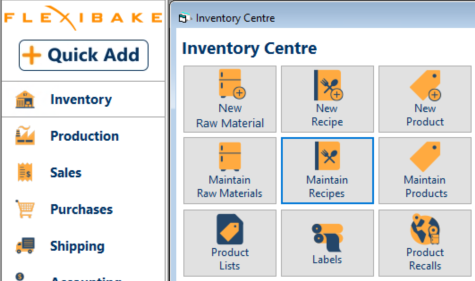
Step 2
Open the recipe by double clicking it, or click it once and then click Edit.
Step 3
Click the Production tab.
Step 4
Enter the recipe lead time, in days, in the Production Lead Time field.
Step 5
Click OK to save your changes.
Tip: Start with the minimum number of days needed to begin the recipe on time, then test the result in Schedule Production.
How Recipe Lead Times Work
Lead time is measured from the product date
Recipe Lead Time is measured relative to the finished product. A 1-day Recipe Lead Time means the recipe should be started the day before the product is scheduled.
Example
If a product is scheduled for Friday and one of its required recipes has a 1-day Recipe Lead Time, that recipe will be moved to Thursday when the product is scheduled with required recipes turned on.
Note: The product still appears on the selected production day. The recipe is what shifts backward based on the lead time.
Use Recipe Lead Times in Schedule Production
Schedule required recipes automatically
The Recipe Lead Time setting takes effect when you schedule a product and choose to have FlexiBake schedule its required recipes automatically.
Step 1
Open Schedule Production.
Step 2
Drag the required product onto the schedule.
Step 3
Before clicking OK, make sure Schedule required recipes automatically is selected.
Step 4
Click OK to add the product and required recipes to the schedule.
Step 5
Review the schedule to confirm the recipe has moved to the correct earlier day based on the lead time.
Tip: If the recipe appears briefly on the product date before moving, this is expected behavior while FlexiBake recalculates the correct scheduled day.
Related Settings and Behaviors
Non-production days
If a Recipe Lead Time lands on a non-production day, FlexiBake will move the recipe to the last day of the previous production week and display a warning so you can review the adjustment.
Warning: Always review automatically adjusted schedule dates if your production calendar does not run seven days a week.
Assume production and delivery dates are the same
The Assume production and delivery dates are the same preference can affect how lead times are interpreted in production scheduling. When this setting is enabled, FlexiBake assumes the delivery day is also a valid production day and subtracts one day from the product lead time. This can change when products appear in production-related tools.
Note: If your lead times do not seem to match the expected production date, review whether Assume production and delivery dates are the same is enabled.
Product Lead Times versus Recipe Lead Times
Recipe Lead Times and Product Lead Times are not the same setting.
- Product Lead Time controls how long the finished product takes from start to finish.
- Recipe Lead Time controls when an individual recipe used by that product must begin.
Both settings may be needed when finished products and their component recipes each require advance preparation time.
When to Use Recipe Lead Times
Good use cases
Recipe Lead Times are most helpful when:
- You want Schedule Production to place required recipes on the correct earlier day automatically.
- A dough must proof overnight.
- A recipe component must cool, chill, or set before use.
- A pre-mix or base recipe is made in advance of final production.
When the setting may not be needed
If the recipe is always made on the same day as the product and does not require advance preparation, the Recipe Lead Time may remain at 0 or blank depending on your current setup.
Additional setup and planning guides
You may also find these articles helpful when working with production scheduling and recipe setup: