
You only need two things to use FlexiBake at the most basic level: product to sell and customers to sell those products to. This tutorial will cover setting up the latter; a tutorial on creating products in FlexiBake is available in our article Create a Product.
While FlexiBake has the ability to store very detailed information on your customers, you are not obligated to use it. This tutorial will include only the mandatory components of the customer profile.
Adding a New Customer
Step 1
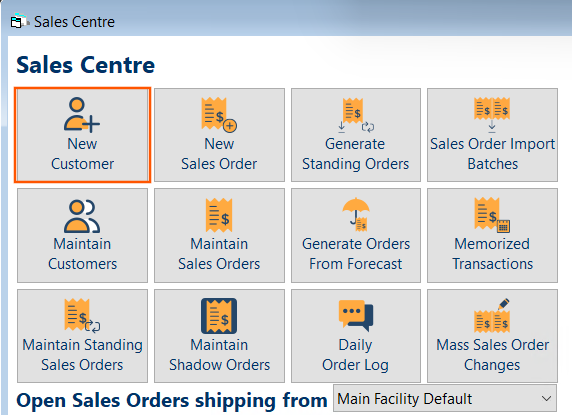
Navigate to the Sales Centre and click the New Customer button.
Step 2
Fill in the mandatory fields, including:
• Company Name
• Default Currency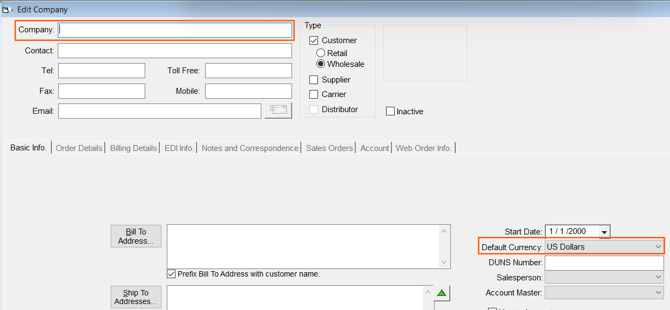
Press OK to save.
Step 3
Navigate to the Billing Details tab and select the customers Payment Terms. Press OK to save.
If you need to add new payment terms, follow our guide Add or Edit a Payment Term
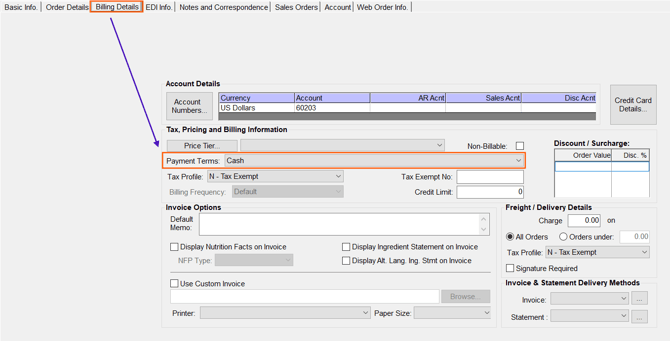
Once this information has been saved, you can access the rest of the tabs to input more detail, or start entering orders!
Next Steps for Customer Set Up:
-
Add Ship To and Bill To Addresses: To be included on various documents created in FlexiBake.
- Create Customer Categories: Create and assign your customers specific categories for filtering reports in FlexiBake.
-
Set credit limits: Set limits on a per-customer basis.
-
Assign a price tier: All customers to access non-standard product prices by assigning them to a price tier.
-
Enable sales taxes: Assign a tax profile to your customers on a per-customer basis.
Video Tutorial
A video tutorial on adding a new customer is available below.
Questions this article might be helpful for answering:
- How to add a new customer into FlexiBake.
- How to set a customers currency.
- Where to assign payment terms to a customer.