
Overview
What Batch Time does
Batch Time is the amount of time required to complete a recipe or a product. If you use multiple recipes to represent stages in the production process, the Batch Time should reflect the amount of time required to complete that specific stage.
Why this matters
Use Batch Times when:
- You want production planning to reflect how long work actually takes
- You schedule production in batches
- You want to compare expected production time to actual production time
- You want to use related features such as Batch Time = Labour Time more accurately
Note: Batch Time is an estimate of the average time required to complete the product or recipe.
Before You Begin
Decide what one full batch means
Before entering a Batch Time, confirm that your Product Batch Size or recipe yield already reflects how your team actually produces the item.
For example:
- A dough recipe may use Batch Time to represent the time needed to mix or complete that dough stage
- A finished product may use Batch Time to represent the time needed to complete one full batch of sell-by units
Tip: Track the time taken to complete the recipe or product several times, then use the average as the Batch Time.
Set Up Batch Time for a Product
Add Batch Time to a Product
Step 1
Open the Inventory Centre and click Maintain Products.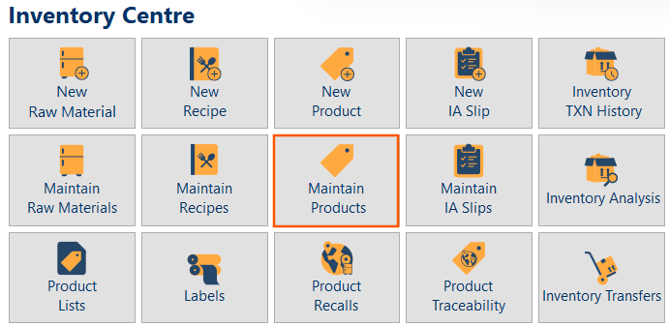
Step 2
Find the product you want to update, then double click it or click it once and select Edit.
Step 3
Click the Ingredients tab.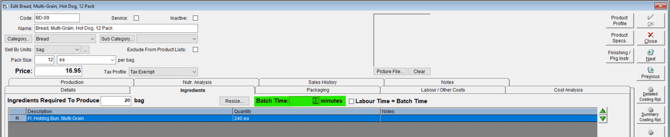
Step 4
In the Batch Time field, enter the time in minutes required to complete one full batch.
Step 5
Click OK to save your changes.
Set Up Batch Time for a Recipe
Add Batch Time to a Recipe
Step 1
Open the Inventory Centre and click Maintain Recipes.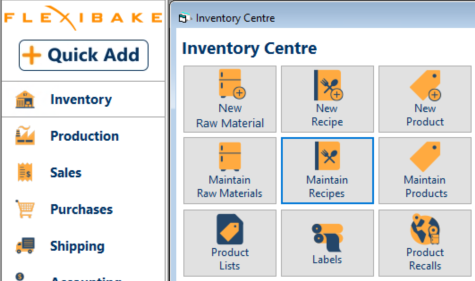
Step 2
Find the recipe you want to update, then double click it or click it once and select Edit.
Step 3
Click the Production tab.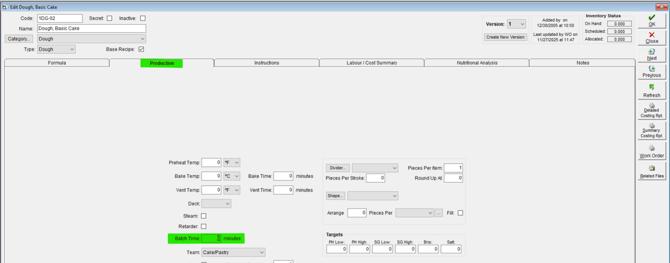
Step 4
In the Batch Time field, enter the time in minutes required to complete that recipe or production stage.
Step 5
Click OK to save your changes.
How to Choose a Good Batch Time
Use an average, not a best-case estimate
Batch Time should represent a realistic average, not the fastest possible run. If the recorded time is too low, planning and labour comparisons may look better than the production floor can actually achieve.
Match the scope of the record
Set the Batch Time based on what that record is meant to represent:
- For a recipe, use the time to complete that recipe or stage.
- For a product, use the time to complete one full product batch.
Warning: Be careful not to mix stage time and full product time together. A recipe Batch Time should describe the recipe stage, while a product Batch Time should describe the full product batch.
Where Batch Time Is Used
Production scheduling and planning
If you schedule production, Batch Times help unlock more useful planning features in FlexiBake.
Comparing planned time to actual time
Once Batch Times are set, you can start recording actual production times and compare real-world performance against the estimated Batch Time.
Batch Time = Labour Time
If labour categories are already set up for a product, you can use Batch Time = Labour Time to make the labour time for each person equal to the total Batch Time. This is useful for production lines where the entire batch requires every station to be manned from beginning to end.
Tip: If your production line requires the whole team for the full duration of the batch, review whether Batch Time = Labour Time is the right fit.
Related Settings
Product Batch Size
Product Batch Size tells FlexiBake how much a batch produces. Batch Time tells FlexiBake how long that batch takes. These settings often work together and should both be accurate for production planning to make sense.
Actual Production Times
After setting Batch Times, you can start recording actual production times to measure how long production is really taking.
Troubleshooting
The Batch Time does not seem accurate
If the Batch Time does not reflect how production actually works, review the time taken across several production runs and update the value to a more realistic average.
Labour timing looks wrong
If labour timing looks too high or too low, review whether Batch Time = Labour Time has been enabled and confirm the labour categories and number of people assigned are correct.
Production planning does not match the floor
If planning looks unrealistic, review:
- the Product Batch Size
- the Batch Time
- whether the Batch Time was entered on the correct record type
- whether the recipe or product is representing a full process or only one stage
Other production setup options
You may also want to review these related setup tasks: