
If you're a Canadian company , you may be charging sales tax to some or all of your customers. FlexiBake can help calculate that tax for you, and send that over to your QuickBooks Online account so that both programs keep in sync and ensure your tax collection is easy and accurate. This guide will take you through how to set up FlexiBake's taxes so that they match QuickBooks Online's requirements so they flow through seamlessly.
Before starting, make sure that your FlexiBake is set to use Sales Taxes
Create Tax Profiles in FlexiBake
Step 1
Log into FlexiBake as a user with Administrator permissions.
Step 2
In the upper menu bar, open the Administration menu and select Maintain Sales Tax Profiles
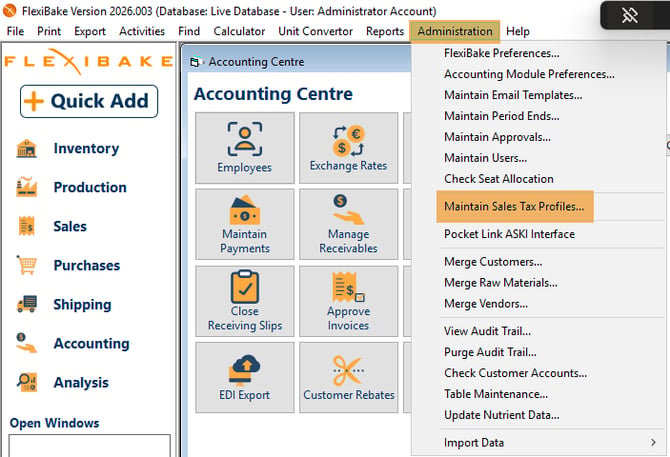
Step 3
In the pop-up window, click the Tax Profile… button in the top left corner.
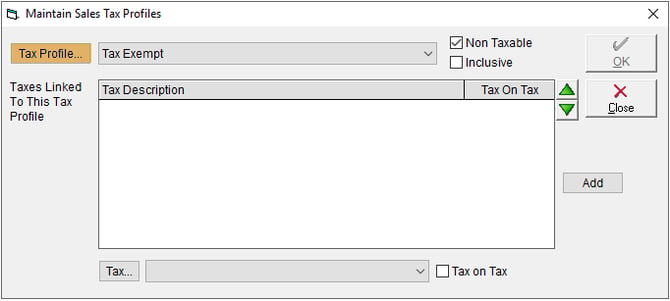
Step 4
A second window will open. Select the New button to begin creating a profile.
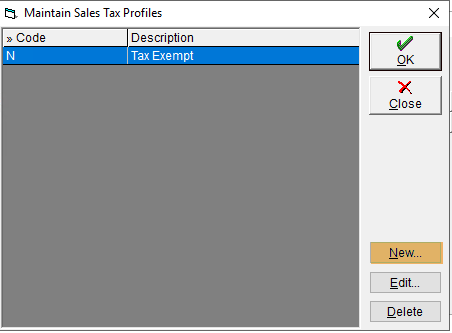
Step 5
Enter a Code and Description for your tax profile. The Code must match the Sales Tax name in QuickBooks online for the taxes to map properly. A list of common Canadian tax codes from QuickBooks Online is available below:
| Province/Territory | Sales tax name | Description | Rate | Taxable or non-taxable |
|---|---|---|---|---|
| All | Zero-rated | Zero-rated | 0% | Taxable |
| All | Exempt | Tax-exempt | N/A | Non-taxable |
| All | Out of scope | Nontaxable goods and services | 0% | N/A |
| Alberta, Northwest Territories, Nunavut, Yukon Territory | GST | Federal goods & services tax | 5% | Taxable |
| British Columbia | GST BC | Federal tax (GST) only | 5% | Taxable |
| PST BC | BC provincial tax only | 7% | Taxable | |
| GST/PST BC | Federal and provincial tax (BC) | 12% | Taxable | |
| Manitoba | GST/PST MB | Combined federal and Manitoba provincial tax | 13% | Taxable |
| GST | Federal tax (GST) only | 5% | Taxable | |
| PST MB | Manitoba provincial tax only | 8% | Taxable | |
| New Brunswick | HST NB | Harmonized federal and New Brunswick provincial tax | 15% | Taxable |
| Newfoundland and Labrador | HST NL | Harmonized federal and Newfoundland and Labrador provincial tax | 15% | Taxable |
| Nova Scotia | HST NS | Harmonized federal and Nova Scotia provincial tax | 15% | Taxable |
| Ontario | HST ON | Harmonized federal and Ontario provincial tax | 13% | Taxable |
| Prince Edward Island | HST | Harmonized federal and PEI provincial tax | 14% | Taxable |
| Quebec | GST/QST QC | Combined federal and Quebec provincial tax | 14.975% | Taxable |
| GST | Federal tax (GST) only | 5% | Taxable | |
| QST QC | Quebec provincial tax only | 9.975% | Taxable | |
| Saskatchewan | GST/PST SK | Combined federal and Saskatchewan provincial tax | 10% | Taxable |
| GST | Federal tax (GST) only | 5% | Taxable | |
| PST SK | Saskatchewan provincial tax only | 5% | Taxable |
Click OK in both windows to save the record and return to the previous screen.
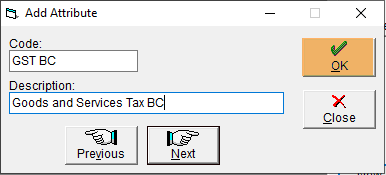
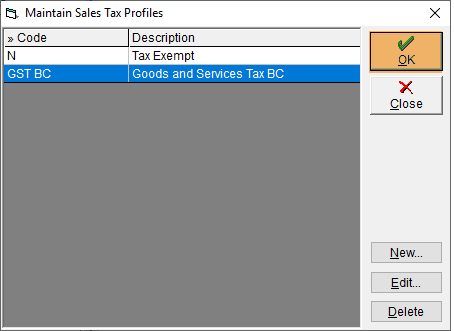
Step 6
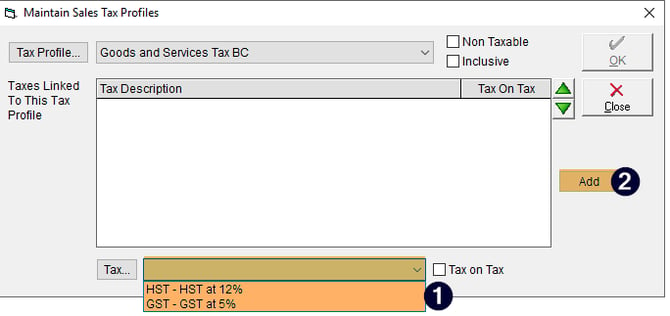
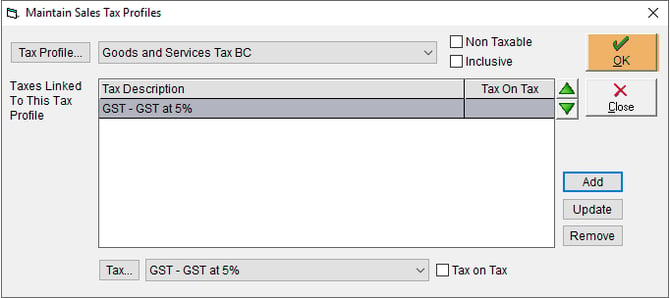
At the bottom of the screen, assign individual taxes to your Tax Profile by clicking the drop-down next to the Tax… button. Click Add to link the selected tax, then click OK to save. To make new tax rates, please see Set Up Sales Tax Rates.
Step 7
Click OK to save your changes
Assign Tax Profiles
Next, you'll want to assign taxes as required by following the guides below:
- Assign Sales Tax Profiles to Products
- Assign Sales Tax Profiles to Customers
- Assign Sales Tax Profile to Freight/Delivery Charges
- Assign Sales Tax Profiles to Freight/Delivery Charges for Specific Customers
How do these taxes interact? Check out our troubleshooting article here to learn more about how FlexiBake applies taxes.
Tax and Mapped Items
If you have defined mapped items for Surcharges, Prompt Payment Discounts and/or Finance Charges, then you'll need to mark those mapped items as tax exempt in QuickBooks Online. QuickBooks requires that these items are mapped to a tax code when adding them to an invoice, but in FlexiBake these are not taxable line items.